Lease administration software for commercial, residential and special-purpose real estate
VemLease keeps every lease, critical date, rent step and charge in one place, with footfall and tenant sales from the same platform. Built for shopping centres, offices and retail, residential portfolios and properties built for one specific use.
A 30 minute demo with a local Vemco team. Company email, no commitment.
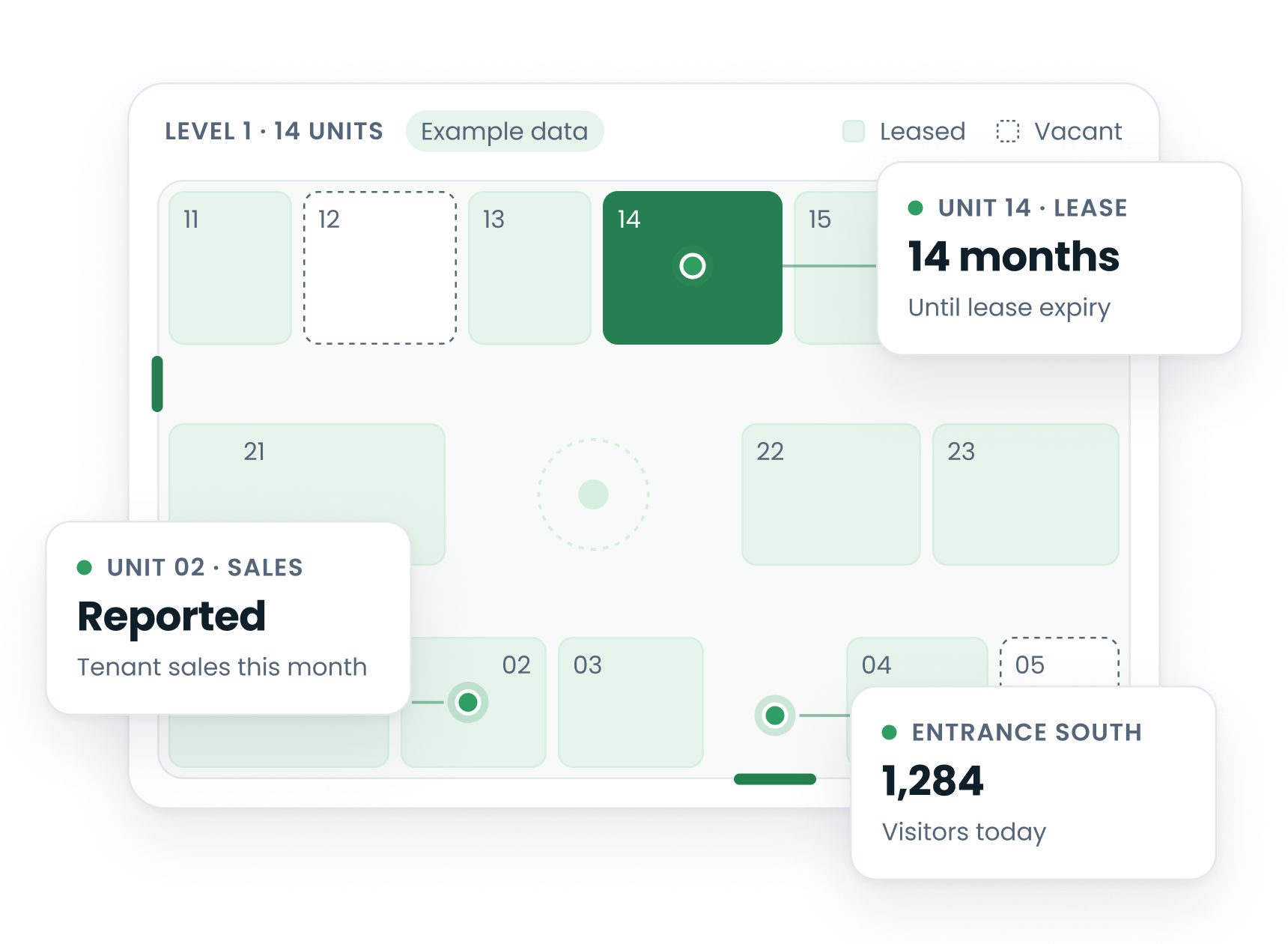
Every lease, date and charge in one system
VemLease keeps the lease, the dates and charges that follow from it, and the rent roll, invoices and reports in one place.
Leases and critical dates
The full lease lifecycle from heads of terms to renewal. Critical dates, options and renewals are tracked, with alerts before they fall due.
Rent steps and indexation
Rent steps, indexation and turnover rent are set on the lease in one flow.
CAM and service charges
CAM and service charge reconciliation in the same system as the leases the charges come from.
Turnover rent
Turnover rent on tenant sales, with the revenue reporting status of each tenant in view.
Rent roll and invoices
Integrated rent roll, invoice management and revenue tracking across all assets and entities.
Tenants and reporting
A tenant portal with documents and invoices, and dashboards and reports for asset managers, leasing directors and finance.
From an empty screen to your first property
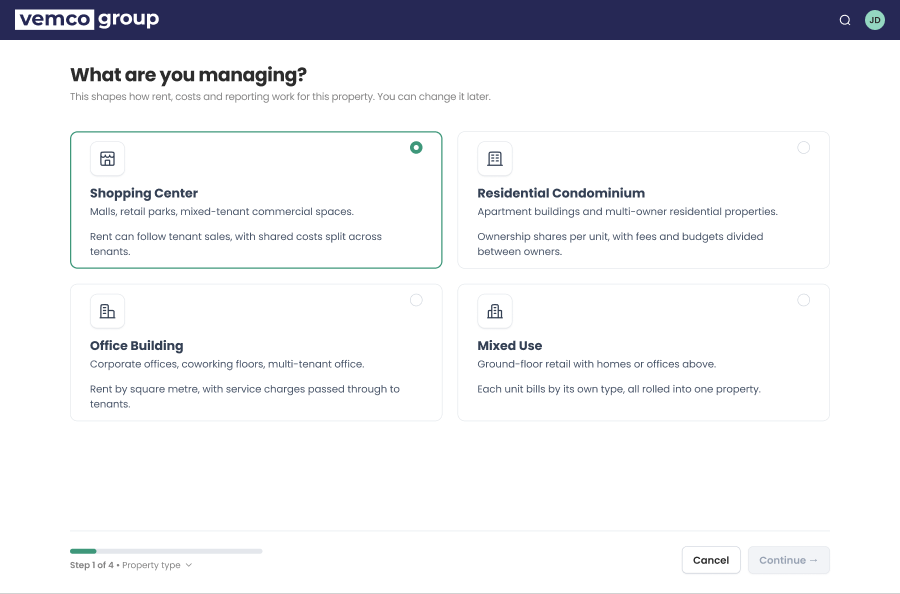
Setting up a property follows the building: what it is, its floors, then the units on each floor.
Start with the property you manage
Setup begins with what you manage: a shopping centre, an office building, a residential condominium or a mixed-use property.
- Property type
- Property details
- Floors and units
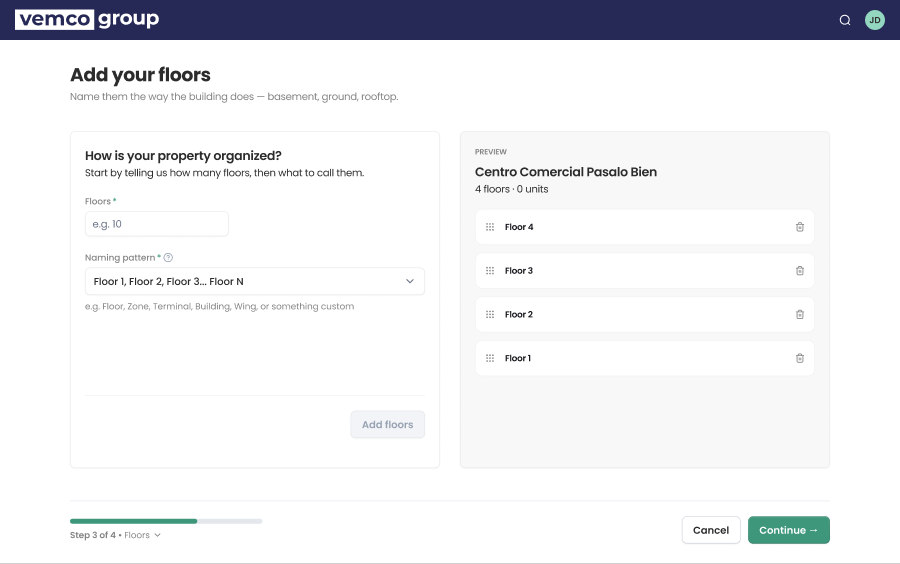
Floors and units, the way your building is laid out
Name the floors of the property and see the structure build up next to them. The units on each floor come next.
- Floors named your way
- Preview of the structure as you type
- Units added floor by floor
The screens show demo data.
The lease, next to what happens in the property
VemLease is built next to footfall, tenant sales and occupancy data from the same company. Each is its own Vemco product on the same platform.
Footfall from Vemcount
Footfall per entrance and floor, from the platform that counts 60+ million people a day.
Tenant sales from VemTenant
Tenant sales and benchmarks, with the reporting status of each tenant.
Preparing a renewal
A renewal shows what lease administration is for. This is how the pieces come together.
1. The date comes to you
Critical dates, options and renewals are tracked on the lease, with alerts before they fall due.
2. The terms are in one place
Rent steps, indexation and charges sit with the lease, next to the tenant’s documents and invoices.
3. The numbers are next to it
Reported tenant sales from VemTenant and footfall from Vemcount show how the unit trades.
4. You decide on facts
Tenant sales alone do not settle a negotiation: lease terms and the market still matter. But you start from what happened in the property.
Lease administration software: common questions
What is lease administration?
Lease administration is the day-to-day work of keeping every lease accurate and acting on it in time: tracking critical dates such as renewals, options and expiries, applying rent steps and indexation, reconciling CAM and service charges, issuing invoices and reporting to owners.
What does lease administration software do?
It keeps leases, dates, charges and documents in one system and reminds the team before a date passes. VemLease does this for commercial, residential and special-purpose real estate, and adds footfall and tenant sales from the same platform.
Who is VemLease built for?
For the teams who run shopping centres, offices and retail, residential portfolios and special-purpose properties: asset managers, property managers, leasing directors and finance.
How is lease administration different from lease accounting?
Lease administration is the operational record: dates, rent, charges, documents and tenant contact. Lease accounting is how leases are reported in the books. VemLease covers the administration side with rent roll, invoice management and revenue tracking. How it fits with your accounting system is part of the demo.
Does VemLease connect to footfall and tenant sales data?
Yes. VemLease is built next to Vemcount footfall, VemTenant tenant sales and VemSpace occupancy data from the same company. Each is its own Vemco product on the same platform.
Where is VemLease hosted and supported?
VemLease is cloud based and supported locally from Vemco Group’s offices.
See VemLease on your own portfolio
A 30 minute demo with a local Vemco team. Company email, no commitment.